Autoreach is a high volume power dialer for sales teams. Rather than cold calling a random list of customers, Autoreach uses AI to create predictive dialing modes and connect with more qualified customers.
Rich Rines, Founder and CEO reach out to run a short engagement focusing on one crucial aspect of the product: the "OmniDialer". After a successful and quick iteration cycle, we moved forward with redesigning the entire platform from the ground up focusing on user centered power features and branching out from there.
Here is the process I employed to craft two main features: the "OmniDialer" and "SMS Broadcasting" during our 3 month engagement:
1 – Project Planning
Good Design is Managed Design
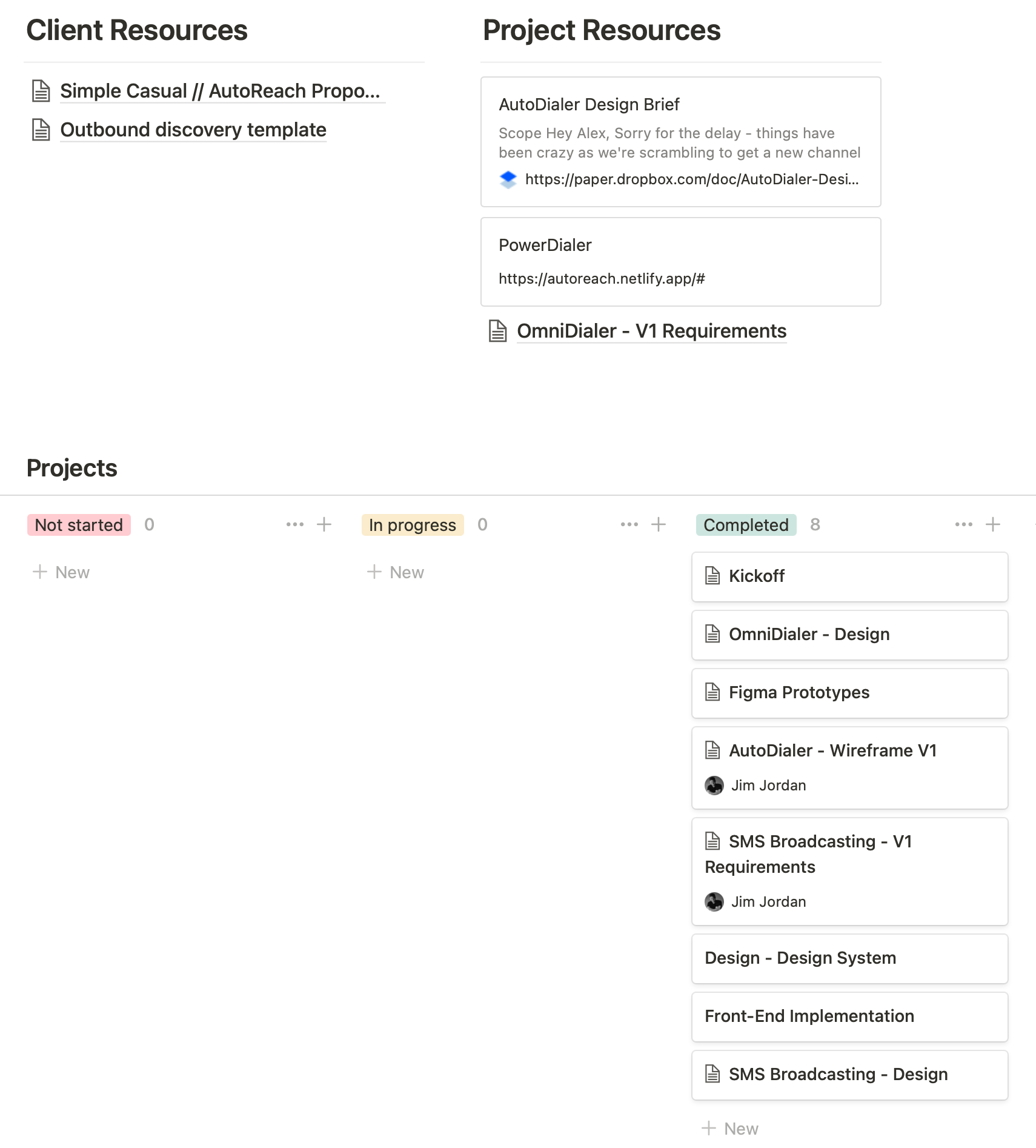
I obsess over client design management. I started using Notion 2.5 years ago while working at Funsize and I utilized it on every project and team. I even use it with my wife to manage our own house projects! While working at an agency, personal design management is plain good practice so there is never uncertainty (and if there is at least it's tracked). While consulting, it's a life saver. There will never be a question of project priority, status, and timeline.
Here's a glimpse of the project board for Autoreach
Get the Facts, Then Act
Before jumping head first into user journey flows, product experience touch points, and applied design, I first hold a series of interviews with whomever I can get on the phone. One major caveat to consulting is the barrier to entry as a result of not being full-time. At the proposal stage it's important that I make clear exactly how much access I have to the internal workings of the org. There's some legal grayness here and access is key for discovery.
Interviews are held either at the beginning or throughout the engagement depending on availability. I pursue questions from a neutral point of view, never sharing opinions and purely getting the facts. Intro questions are super basic, and, if your interviewee is good and you're lucky, lead to more nuanced and revealing answers. Something as simple as "who are your customers" can lead to "what friction in the product caused this pattern of failure to emerge". The product is nearly designing its-self at this point.
Here's a good resource for neutral interview questions.
Mise en Place Design
Whether it's scoping a full product or dialing in a single feature, I like to create mini-PRD's. They function as the rudder for the design; a place where all terms, functions, interactions, etc. are detailed like a thesaurus. I frequently reference the Product Hunt PRD. Just like a chef get's all their ingredients together before starting, I prefer to solidify all scraps of requirements and thoughts together before "designing".
SMS Broadcasting - V1 Requirements
2 – UX Design Activities
Whimsical
The reason I use Whimsical is the same reason I use Figma: find the right tool that enables you to do good design fast. If you've ever tried to create user flows, wireframes, and site maps in a design tool like Sketch and Figma, it can be fairly cumbersome.
I spend about 50%-75% of design time in Whimsical. This get's back to the "mise en place" aspect. I find it's nearly impossible to track requirement updates and product shifts within the design tool. If we need to change a touch point in a flow, it's much fast to do that in an abstract environment, analyze, then execute in Figma.
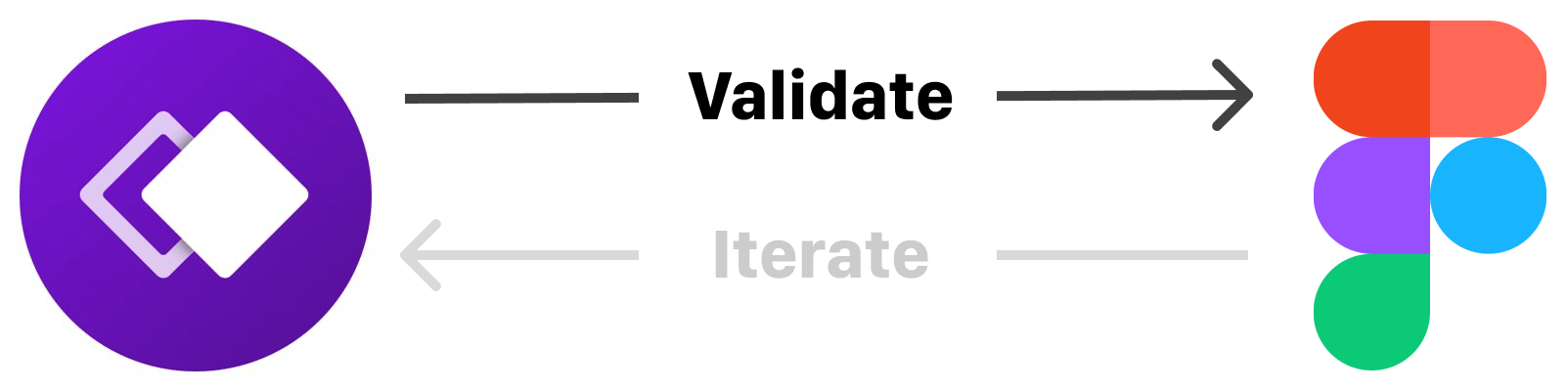
After getting client approval on design requirements, we jump into Whimsical and start mapping overarching flows. These flows were revisited all the time during the design phase. Rather than moving from this product to that product, we made sure Whimsical was where we captured major feedback and design decisions ("source of truth"). Then we move to Figma where we test our assumptions and validate.
UX Examples
Main Broadcast Flow
When we started this piece, the messages page did not exist. We used this broadcasting feature to uncover those inevitable touch points a user will need access to. This is like creating a site map from the inside out.
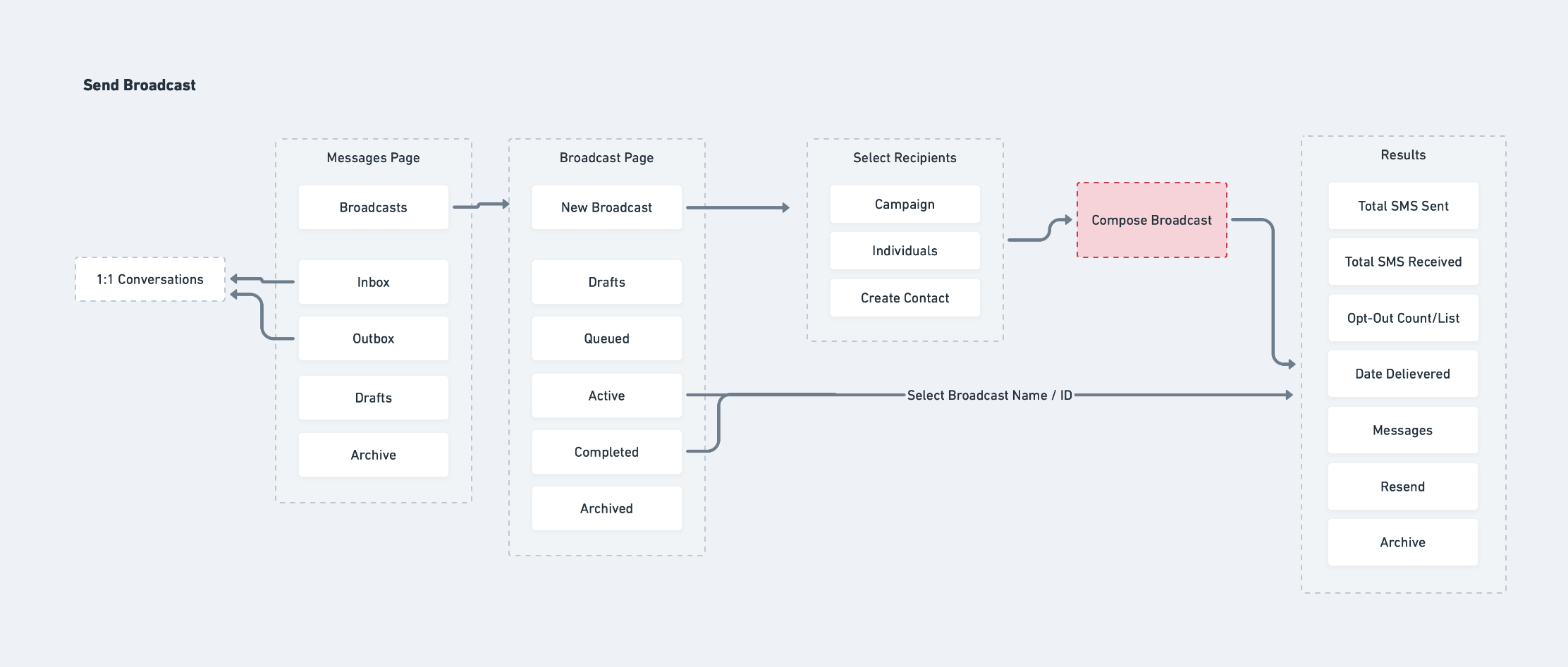
The bread of the broadcasting flow sand-which. All of the major nav points without the feature outlined.
SMS Broadcasting cont.
If you've ever received a text about a sales offer from a vendor you've shopped with or an appointment reminder, this is the view where those messages are crafted. For SMS Broadcasting, we developed two major flows dependent on technical direction: AI mapping auto-responses based on keyword repositories and manual, 'custom threading' responses. The main challenge with broadcasting is once your message is out to, say, 300 people, you've now opened up 300 unique customer journeys with individual terminating points (when we stop texting). Predicting responses is very difficult but using content wisely you can point people to the right direction.
AI Auto Response
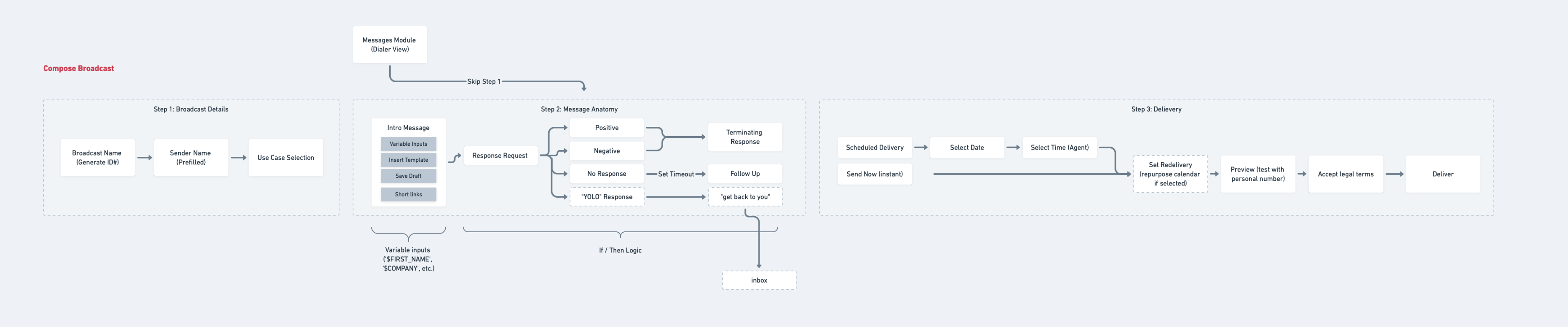
The key step here is #2: Message Anatomy. Autoreach's main goal is to simplify customer sales communication and one technical challenge we conceptualized was allowing AI to map the general tone of a customer's response and send the appropriate reply. In theory we were pleased with the results, however in practice this required generating a keyword corpus for not just every iteration of 'yes','no',cancel', etc. but also the misspelled and reformatted variants. We opted for a more controlled, manual response.
Custom Threading
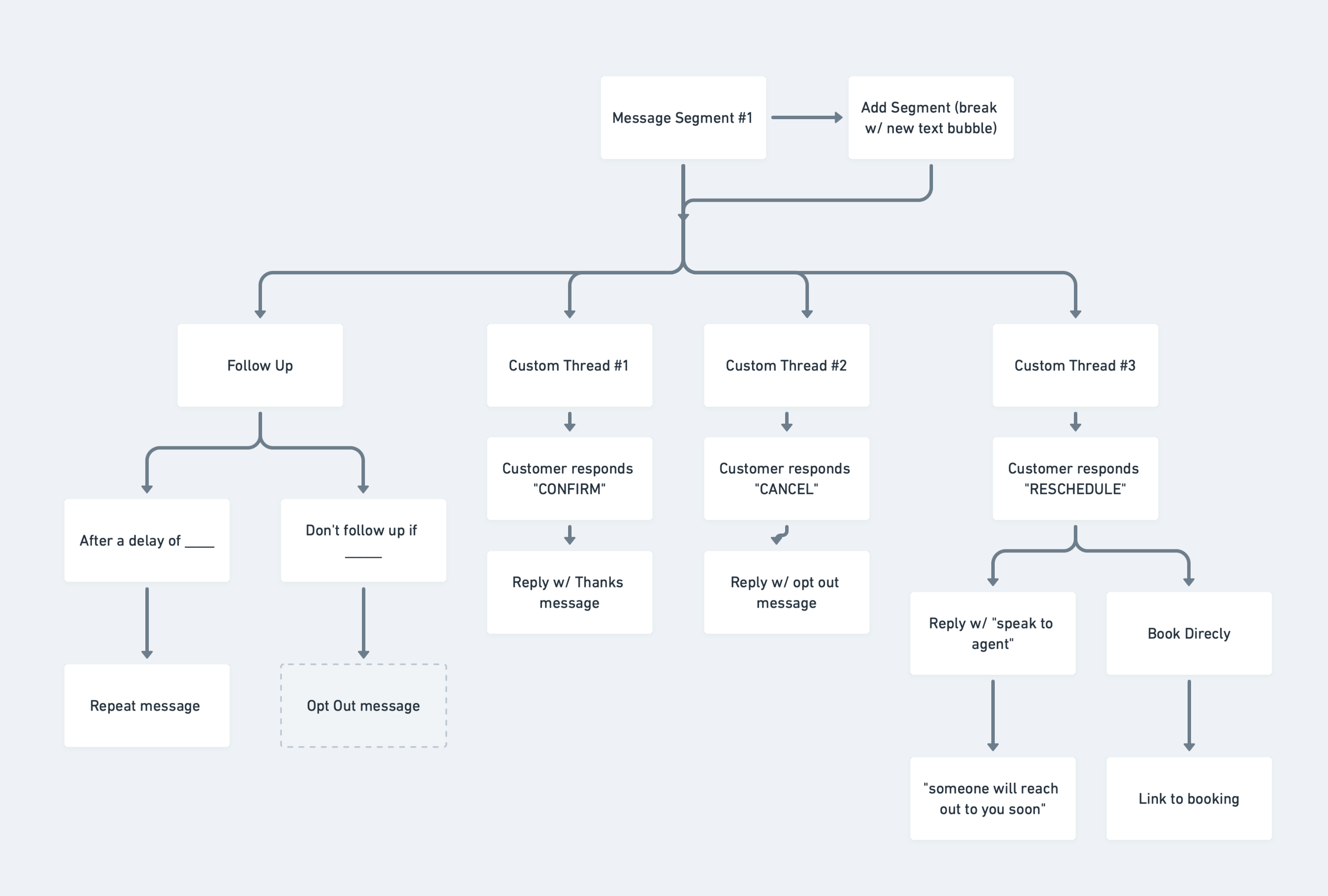
In place of Response Request generation, we opted for a traditional approach. This is like creating the rules of an email thread before the message is sent. The agent can create however many iterations of threading may be required to qualify a customer. In this example, we used a schedule confirmation message example to generate custom threads. There is a lot of work on the front-end for the agent but this yields predictable responses that can be followed up appropriately.
OmniDialer
Today, Autoreach's dialer exists as a chrome extension that lives within a sale's reps tool of choice. Our job was to craft a holistic smart dialing experience where everything lives in a single viewport. The main components are the dialer, customer context, and mid-call scripting.
First we captured the main flow a sales rep ("agent") would experience:
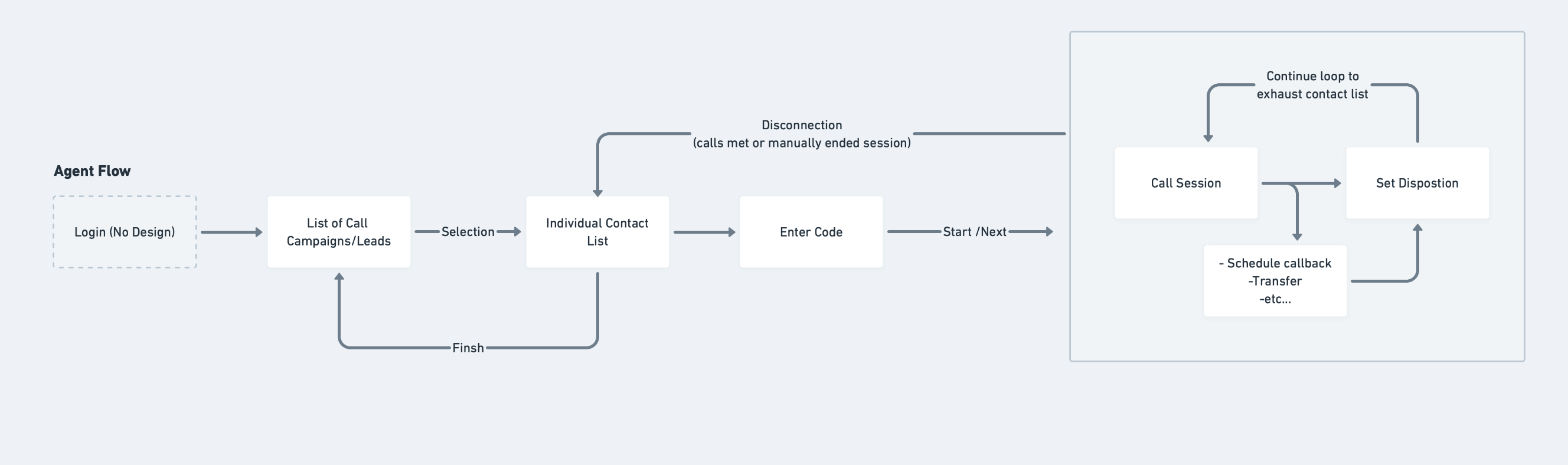
There are two ways to transfer a call both of which have a different set of use cases

One of the key components for a sales call is setting a disposition:
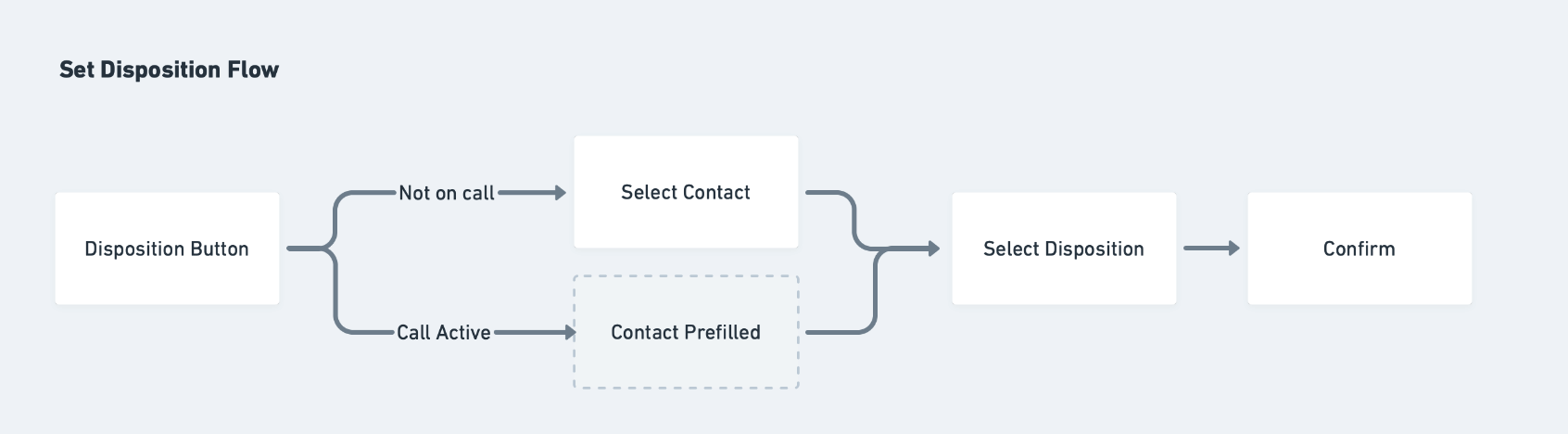
A customer can be reached by a different agent with each call so creating a running history of previous calls was key for customer satisfaction. You can imagine the frustration of having the same exact conversation with several different people all trying to sell you the same thing. Terrible sales leads to zero conversion; not good.
Using Whimsical, we iterated on a single "mid-call" view. This is the point at which a sales rep is automatically connecting with customers, reading and filling out scripts, and taking note of previous calls. Focussing on this one major touch point allowed design to be nimble and act as a supportive informant with the dev team when edge cases were brought up during testing.

3 – UI Implementation
Figma
Moving from abstracted flows to high-level user interface prototyping happens after we all approve the general flow. I typically rely on a proven design system to work within for start-up companies that lack strong marketing design or branding.
I started with a Figma design system that captures all your basic web functionality: buttons, forms, tables, calendars, etc. From there we applied some custom styling to give it a unique flavor (a product utilizing material design typically looks like a Google product). This is just a baseline to get us a head-start. The design process uncovers the product's unique approach to customer problem solving where we invest most of our design time.

Prototype Examples
Some clients prefer to have a near 1:1 prototype that covers almost everything in a single view, however I often suggest taking it flow by flow. Below are two live examples of feature prototypes I developed based on our Whimsical UX work.
SMS Broadcasting / Custom Threading
4 – In Summary
For three months I led Autoreach design by defining features, creating requirement documentation, developing a design system, and delivered over 15 individual flows for two major functions of the product. The project is still ongoing and his team is currently implementing the design.
We're eager to begin testing with real sales reps and continue to develop and refine the product as a whole. I'm confident that Rich and his team can take the baton and run knowing they have a strong design foundation to build on.